
Your next client meeting, already prepared.
Alcova briefs you before every client meeting, captures and structures the conversation as it happens, and updates your CRM and compliance record after. On video calls or in person. You walk in knowing everything, and walk out with the admin already done.
Set it up yourself in a few minutes.
Illustrative.
You already know this feeling.
Rushing between meetings. Scrambling to remember what you discussed last time. Realising mid-conversation that you have missed something. The context is scattered across tools, and the follow-ups slip.
Hours a week piecing the picture together before each meeting.
The CRM, the inbox, last time’s notes, all in different places.
The task you meant to log, the note you never wrote.
Prepared before, captured during, done after.
Three things, in the order they happen, from the first meeting.
Walk in knowing everything.
Before every meeting, Alcova pulls the client’s history into a brief you can scan before you walk in. No more digging through CRM tabs, no more “remind me what we discussed last time”. You have the context, the open items, and what to talk about.
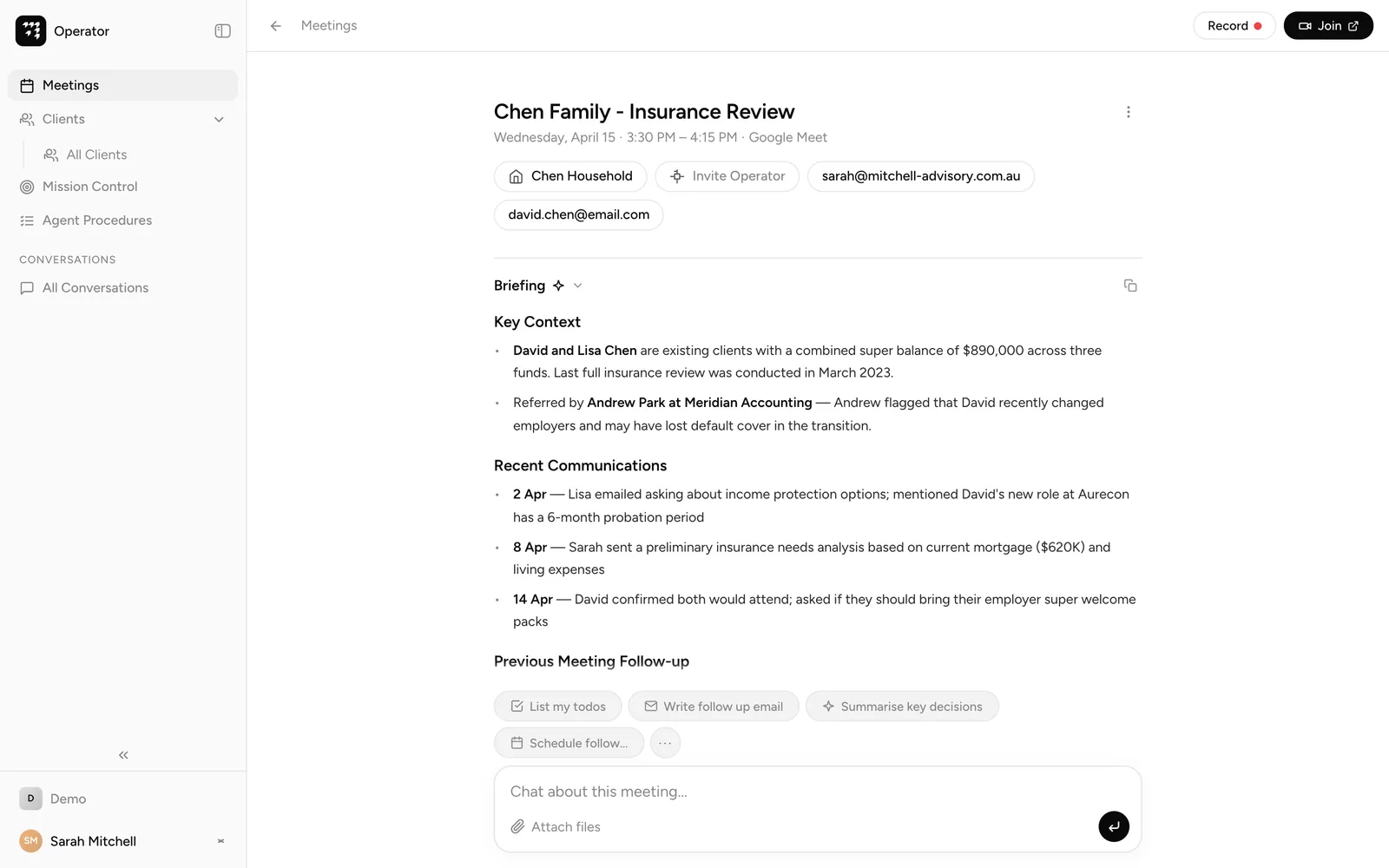
The briefing as Operator builds it, before you walk in.
Notes that write themselves, structured the way you work.
While you focus on the conversation, Alcova captures everything and organises it into the sections your team already uses: decisions, action items, compliance notes, client sentiment. Every section is customisable, mapped to your compliance framework.
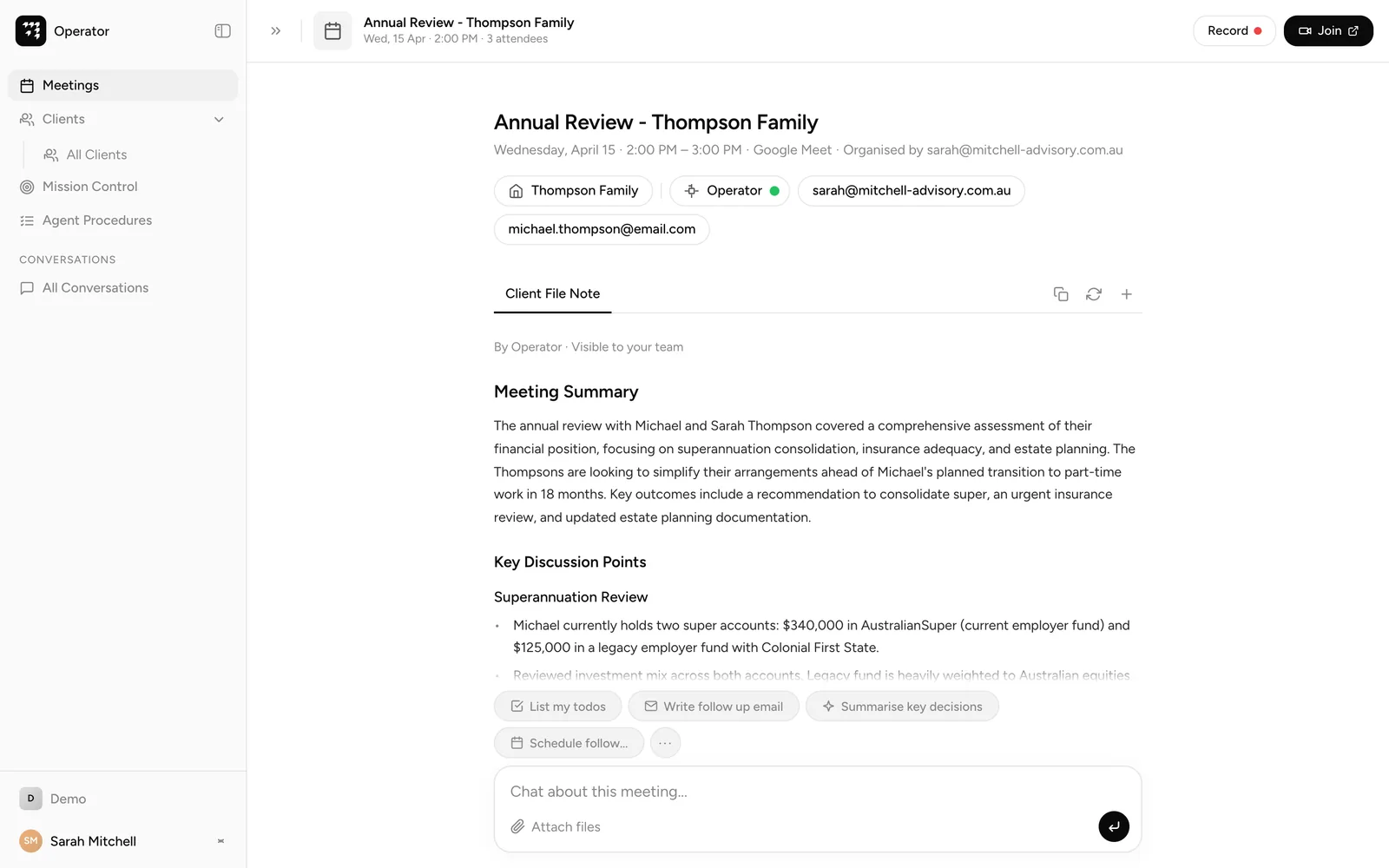
The file note, minutes after the meeting. By Operator, visible to the team.
Your CRM updates itself.
The meeting ends, and within moments the notes are structured, your CRM is updated, and the compliance record is written with a full audit trail. It reads your existing client context and writes back, in Salesforce or Microsoft Dynamics 365.
No copy-paste. No manual data entry. No forgetting.
No copy-paste. No manual data entry.
Your meetings, in the tools your team already uses.
Everything a meeting leaves behind, the briefings, transcripts, notes and action items, is there in Operator, and available through MCP, the Model Context Protocol, to Claude, Microsoft Copilot or ChatGPT. Ask what a client said last time, draft the follow-up, or pull the action items, from the tool your team already works in, with the firm’s permissions enforced.



Every meeting becomes a launchpad.
A meeting note is a starting point. When your firm is ready, Operator turns any conversation into action, and carries the work across the firm.
Operator handles the execution. See Operator.
Built for every meeting, every adviser.
From online calls to in-person catch-ups, Alcova covers the full meeting lifecycle.
Set up in minutes, on your own.
Connect your calendar and Alcova joins your next meeting. Nothing to deploy, no rollout to manage.
The questions advisers ask first.
How fast are the file notes?
Moments after the meeting ends, in your firm’s format, with most of the editing already done.
Does it work for in-person meetings?
Yes. Use the iOS app for in-person meetings, and Alcova joins your video calls as well.
Will the notes match how our firm writes them?
Yes. Alcova works from your firm’s terminology and note structure, customisable to your compliance framework, so what comes back fits how your firm already records things.
Can I use my meetings in Claude, Copilot or ChatGPT?
Yes. Through MCP, your briefings, transcripts, notes and action items are available in the tools your team already uses, with the firm’s permissions enforced.
Which CRMs does it sync to?
Salesforce and Microsoft Dynamics 365, reading your existing context and writing back.
Do I need IT to set it up?
No. You connect your calendar and you are running in a few minutes.
Is my data secure?
Yes. Your data stays in Australia, it is encrypted, and it is never used to train any AI. More detail is on Security.
Stop doing the prep. Walk in prepared, walk out done.
Set it up yourself in a few minutes and let Alcova carry the prep, the notes and the admin. When your firm is ready, Operator takes the same understanding of your clients into your emails, documents, and the work behind advice.